
One User, Many Machines: The Question That Ruined My Sleep
In my previous blog, I talked about how a simple remote shutdown script spiraled into something much bigger. What started as SSH access to my laptop eventually became a distributed ecosystem connecting my laptop and phone through Tailscale, automated backups, remote execution, telemetry, clipboard sync, file management, and a growing collection of tools that blurred the line between two physical devices. At the end of that journey, I thought I had won. I had broken the barrier between two machines. Then one night, a deployment failed, and that single failure ruined my sleep.
The Incident
As usual, my backup system was doing its job. Every night, snapshots were created automatically: projects were backed up, configurations were backed up, secrets were backed up, and everything looked healthy. Then late one evening, I received a message:
"Deploy now."
I wasn't near my laptop, but that wasn't a problem anymore. Weeks earlier, I had built an ecosystem specifically for situations like this. I opened Termux on my phone, navigated into the latest snapshot, changed into the repository, and ran the usual deployment ritual:
Instead of deploying, Git exploded.
Something Was Wrong
The errors made absolutely no sense: Git was complaining about missing objects, missing references, and repository corruption. At first, I thought maybe I had mistyped something. Then I ran:
Only a single commit appeared. One. A repository that should have contained hundreds of commits suddenly looked like it had just been created.
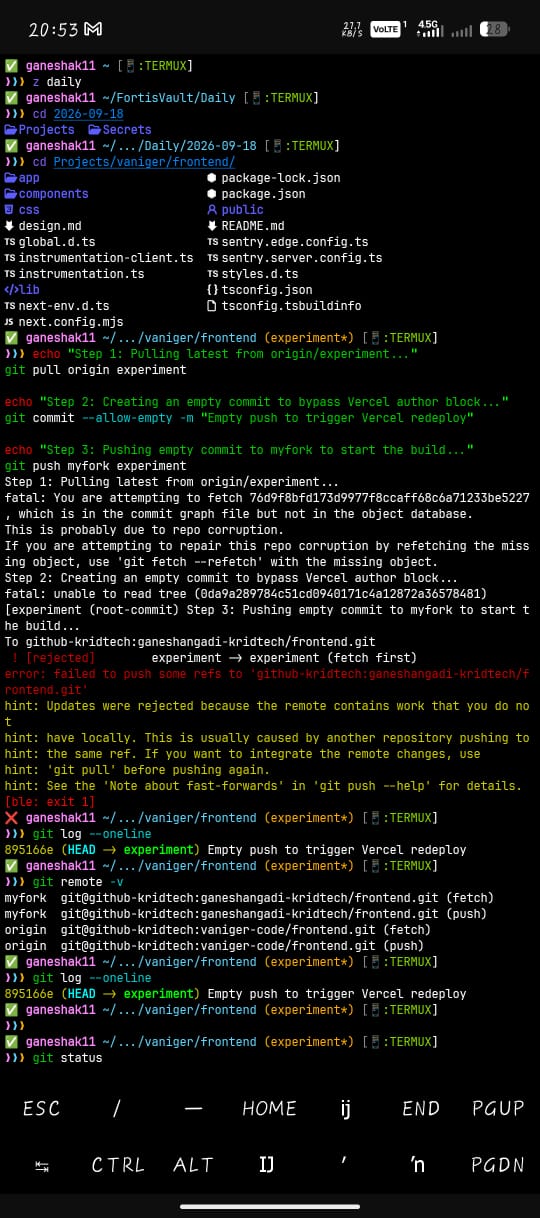 Termux displaying Git repository corruption and missing commit objects
My first thought was immediate: the .git directory is corrupted. I wasn't even surprised. The backup had been created during a network transfer; somewhere between the laptop and the phone, part of the repository metadata hadn't made it across successfully. The ref/heads and loose objects were partially missing. The source code was there, the folders were there, the files were there—but Git wasn't.
The Backup That Saved The Backup
Luckily, snapshots existed for a reason. I immediately switched to the previous day's snapshot:
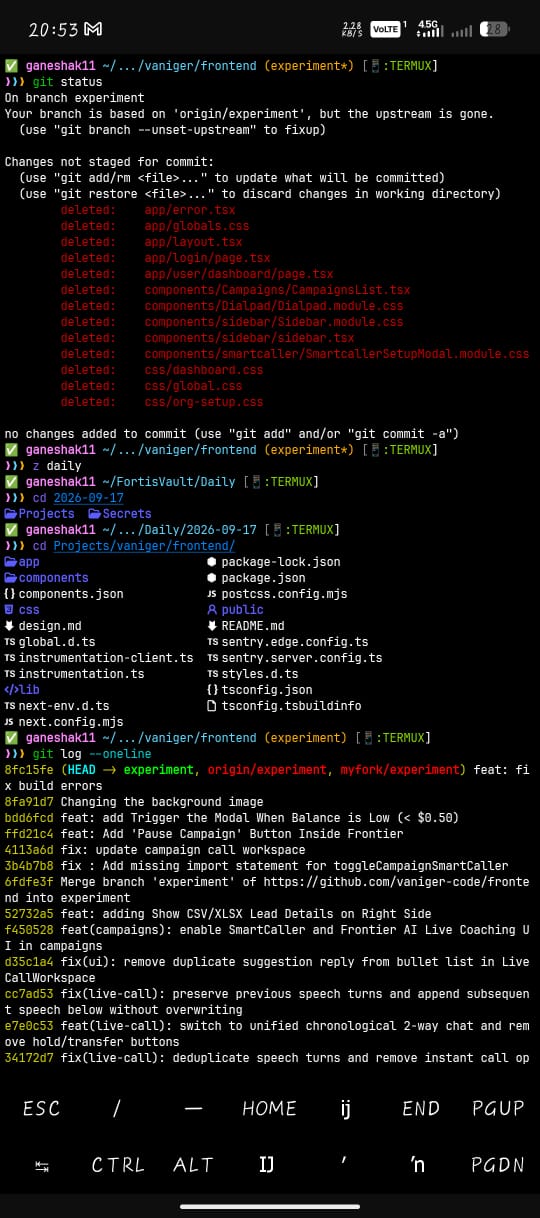 Termux showing deleted working directory files and switching to the healthy 2026-09-17 snapshot
Same repository. Same deployment commands. Everything worked perfectly: production deployed, and the problem was solved. Or at least, it should have been. Most people would have moved on, but I couldn't.
The Question
The corruption itself wasn't bothering me. The cause was obvious: a network interruption, a partial transfer, a broken backup. That wasn't the interesting part. The interesting part was this: why was I copying all of this data around in the first place?
Think about what was happening. The laptop contained the files, the phone contained the files, tomorrow's backup would contain the files, and yesterday's snapshot contained the files. I was storing the same information over and over again across multiple devices. Every copy introduced another opportunity for corruption, another synchronization problem, another consistency problem, and another point of failure. The more I thought about it, the more ridiculous it seemed.
An Earlier Experiment
A few days before this incident, I had been experimenting with something completely unrelated: I successfully mounted my phone's filesystem directly onto my laptop. For the first time, the files weren't being copied—they were simply being accessed. The distinction sounds small, but it isn't: one approach creates duplicates, while the other creates access. And suddenly, a completely different idea emerged.
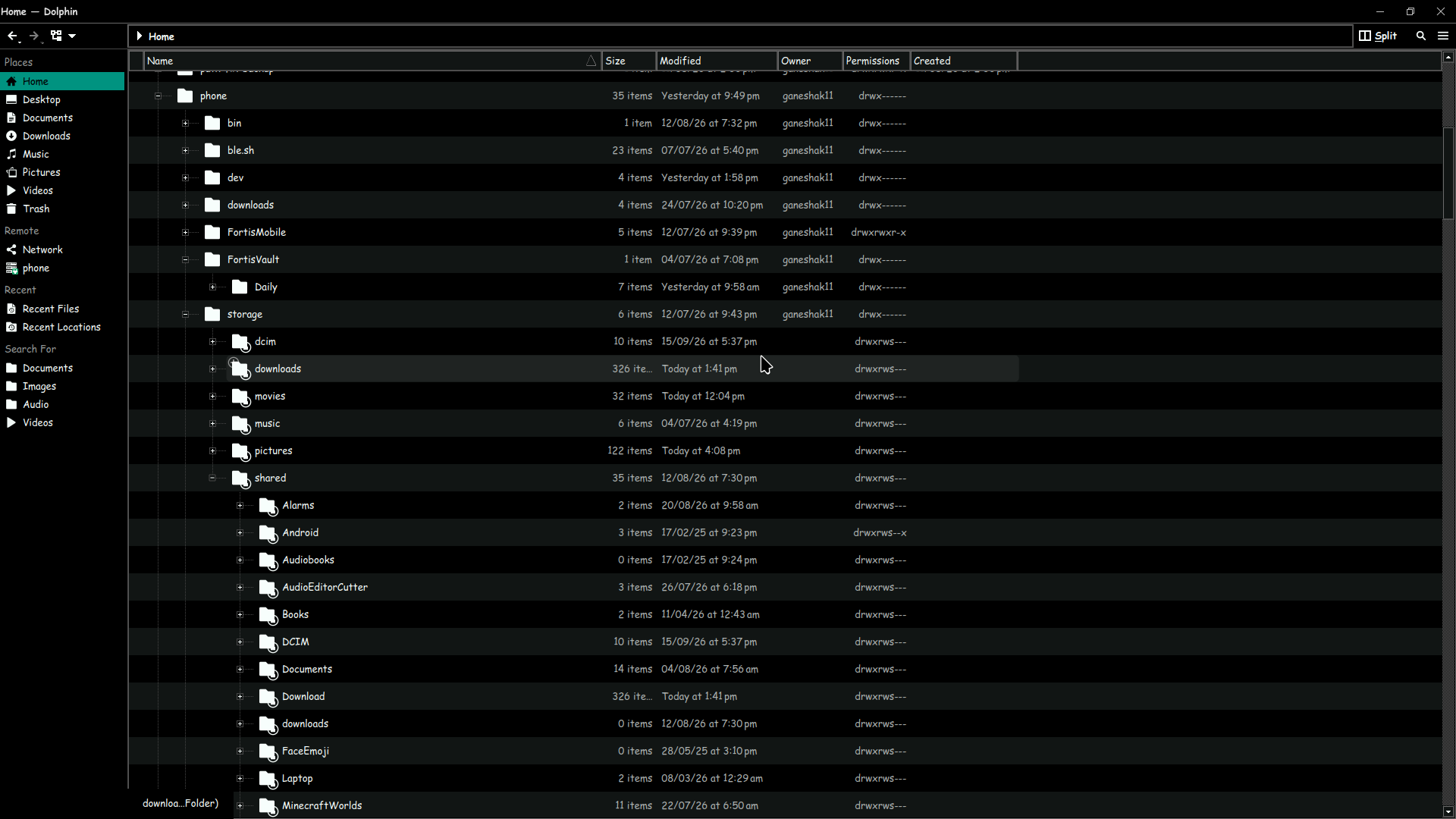 Dolphin file manager on Linux showing phone filesystem directly mounted
What If Files Existed Only Once?
Instead of storing redundant copies across every machine:
What if there was only a single canonical home:
And everything else simply consumed it? Laptop, phone, tablet, and future devices—none of them own the files, none of them replicate the files, they simply access them from a single source of truth that is always powered, always connected, and always available. At first, this sounded like a typical home server project. Then things got weird.
Wait... Aren't Google, Apple, and Microsoft Already Doing This?
That question hit me almost immediately, because if the answer is yes, then this entire idea is pointless. Google Drive exists, iCloud exists, OneDrive exists. What exactly am I inventing here?
The answer took me a while to understand: they're solving file synchronization, while I'm trying to solve something else entirely.
Synchronizing Files vs. Synchronizing Identity
Google synchronizes photos, contacts, passwords, and browser tabs. Apple synchronizes notes, messages, photos, and keychains. Microsoft synchronizes documents, Office files, and settings. But every device is still fundamentally its own machine: your phone is still a phone, your laptop is still a laptop, and your desktop is still a desktop. The devices remain independent, and only some data moves between them.
My idea wasn't about synchronizing files. It was about synchronizing myself.
One User, Many Machines
Traditional operating systems are built around a simple assumption: One Device, Many Users. Every machine owns its files, configurations, applications, state, and identity, while users merely log into it. But what if that assumption was backwards? What if the architecture looked like this?
Now the user becomes permanent, and the hardware becomes temporary.
The Realization
I wasn't trying to synchronize documents, photos, or passwords. I was trying to synchronize shell aliases, clipboard history, scripts, notes, configurations, secrets, knowledge, state, and context—everything that makes a computer feel like my computer. Not a device, but an environment.
The Node Barrier
The previous blog was about removing distance; this idea is about removing nodes. The laptop and phone already communicate, so the next question became: why should they exist as separate environments at all? Why should my phone know less than my laptop? Why should one device have files another device can't see? Why should one device have configurations another device doesn't understand? Why should one device be considered primary? The more I explored the idea, the more another possibility emerged: maybe the devices aren't the important part. Maybe the user is.
The Pseudo Operating System
This is where Fortis stopped feeling like a collection of scripts and started feeling like something else entirely: not an operating system, but a layer above operating systems. Linux remains Linux, Android remains Android, and Windows remains Windows, but above them sits another layer:
A pseudo operating system—not replacing the OS, but unifying it.
The Future Architecture
The architecture currently living in my notebook looks something like this:
When connected, devices read directly from the source with minimal local storage and instant synchronization. When disconnected, they use a local cache, queue changes, and sync when back online. Metadata always exists locally, while actual content is fetched only when required—almost like how operating systems handle memory pages, except applied to an entire personal ecosystem.
The Question That Ruined My Sleep
The funniest part is that none of this started from some grand vision. It started because a Git repository got corrupted. A failed deployment forced me to ask: Why am I copying everything? That question became: Why are devices separate? Which became: Why does every device need its own environment? Which eventually became: What if the operating system belonged to the user instead of the machine?
I still don't know whether this idea is brilliant, impossible, or completely insane—probably a little bit of all three. What I do know is that a corrupted .git folder somehow turned into five pages of architecture diagrams, several cups of coffee, and a concept that I haven't been able to stop thinking about since. And unfortunately, I suspect this rabbit hole goes much deeper.
The Series
✦ Fortis Series:
- ▹Part 1: The Journey from Remote Shutdown Scripts to a Personal Ecosystem
- ▹Part 2: One User, Many Machines: The Question That Ruined My Sleep (Current)
Written by Ganesh Angadi
DevOps Engineer • Backend Engineer • Platform Engineering